
The best free Instant Data Scraper alternatives (2026)
Instant Data Scraper is a great one-click grab, but people outgrow it for specific reasons. Here is an honest roundup of the best free alternatives in 2026, what each is good at, and where each one stops.
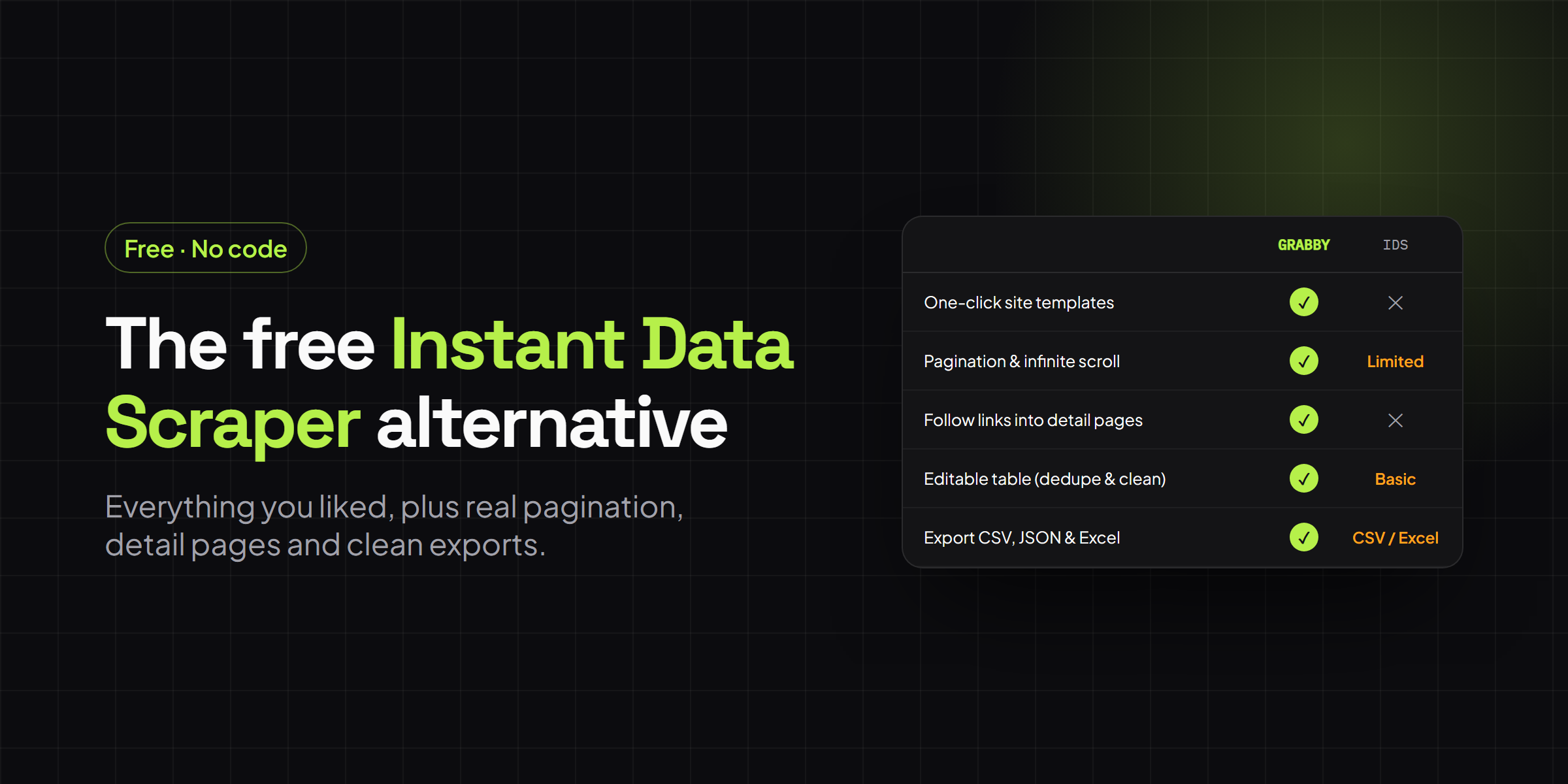
Instant Data Scraper is one of the most popular free, no-code scrapers on the Chrome Web Store, with over a million users and a 4.9 rating. Open a page, click a button, and it guesses the main table or list for you. It is still free in 2026, and for a quick single-table grab it is hard to beat. So why look for an alternative? Most people hit the same walls: it reads only the list page in front of it, it can’t follow a row’s link into a detail page, and hand-picking fields on a card-style layout is awkward. This is an honest roundup of the best free alternatives this year, what each one does well, and where each one stops. One of them, Grabby, is ours, so treat that section as the one to read most skeptically. The rest of the picks stand on their own.
How we compared them
“Free” means different things across these tools, so that is where the comparison starts. Some are free forever with no account. Others give you a free tier that runs on your own machine, then put scheduling and cloud runs behind a paid plan. We also looked at the things people actually leave Instant Data Scraper for: picking specific fields, paging through results, and following links into detail pages. The six criteria below are the ones that decide most real jobs.
- Free tier. What you genuinely get at no cost, and where the paywall sits.
- No-code. Whether you can build a scrape by clicking rather than writing selectors.
- Pagination and infinite scroll. Paging through results and loading more as you scroll.
- Detail-page scraping. Following each row’s link to pull extra fields from the page behind it.
- Export formats. How the data comes out.
- Cloud vs local. Whether runs happen in your browser or on a server you can schedule.
The best free Instant Data Scraper alternatives at a glance
| Tool | Free tier | No-code | Pagination & scroll | Detail pages | Export formats | Cloud vs local |
|---|---|---|---|---|---|---|
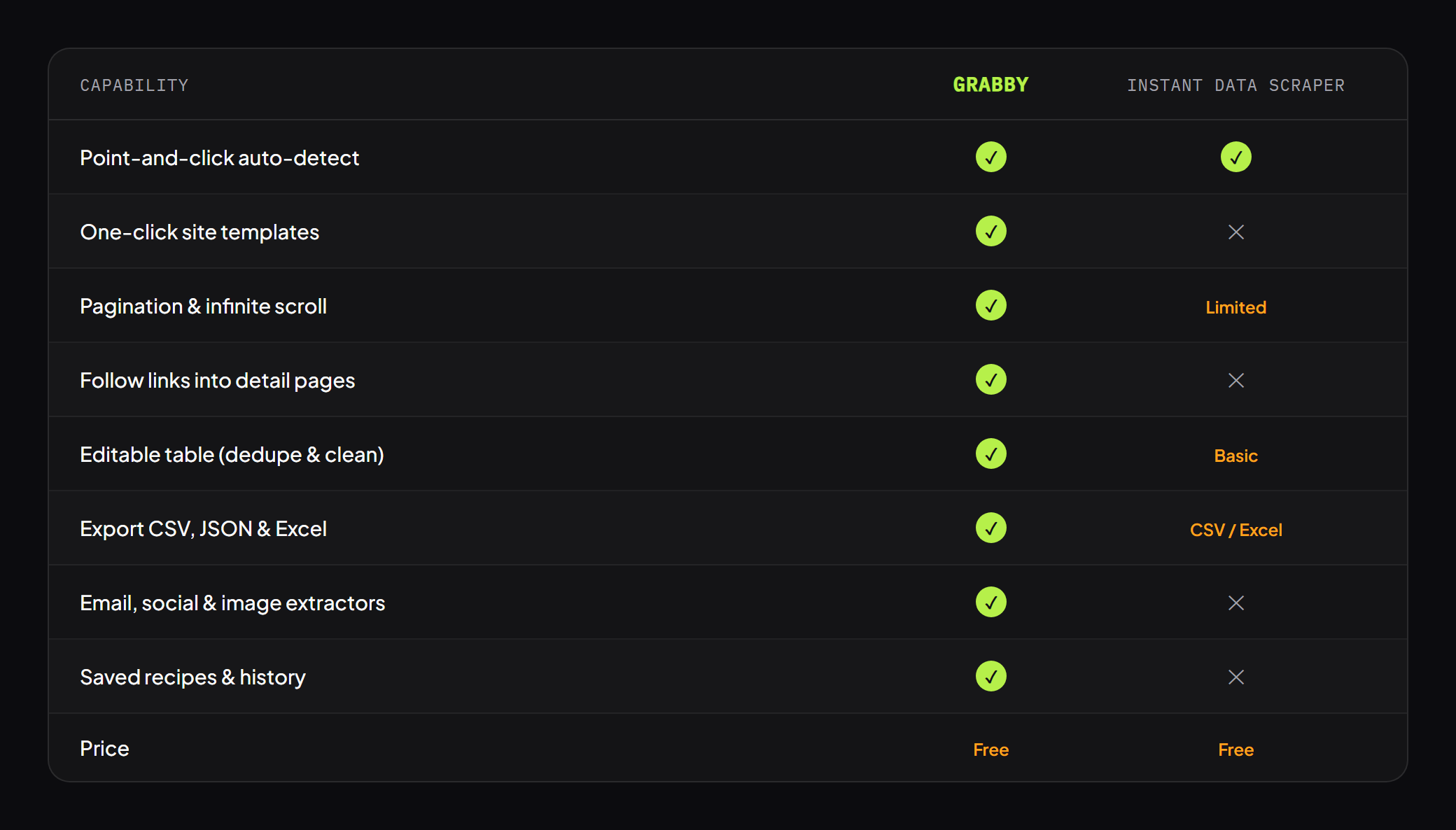
| Instant Data Scraper | Fully free, no account | Yes, auto-detect | Yes, both built in | No | CSV, XLSX | Local (browser) |
| Grabby | Free in early access, no account | Yes, auto-detect plus point-and-click | Yes, with a page or row limit | Yes | CSV, JSON, Excel (TSV), Markdown, Google Sheets | Local (browser) |
| Web Scraper.io | Free extension, local only. Cloud from about $50/mo | Yes, visual sitemap builder | Yes, via selectors | Yes, link selectors | CSV, XLSX. JSON on cloud | Local free, cloud paid |
| Octoparse | Free forever, 10 tasks, local runs. Paid from about $69/mo | Yes, visual workflow builder | Yes | Yes, deep crawl | CSV, Excel, JSON, databases | Local free, cloud paid |
| ParseHub | Free, 200 pages/run, 5 public projects, 14-day retention. Paid from about $189/mo | Yes, desktop app | Yes | Yes, click into links | CSV, Excel, JSON, API | Desktop app, cloud runs paid |
Pricing is the public list price as of 2026 and shifts over time, so check each site before you buy. None of these tools solve CAPTCHAs or scrape sites that actively block automated browsing. That is a shared limit of any no-code scraper, not a mark against any one of them.
1. Instant Data Scraper, the baseline
Worth keeping in the picture, because it is the tool everyone is comparing against. Instant Data Scraper scans a page, highlights what it thinks is the main table or list, and lets you try another table if the first guess is wrong. Pagination and infinite scroll are one tick each, exports go to CSV or XLSX, and the whole thing runs in your browser with no account and no cost. For a tidy table on a simple page it is close to instant, which is why it has the user base it does. The limits are narrow but real. It targets one structure per run, it has no way to follow a row into a detail page, and cleanup is limited to renaming and filtering columns. If your job is a single clean table, you may not need anything on this list. The rest of the picks are for when you do.
2. Grabby, the top free no-code pick
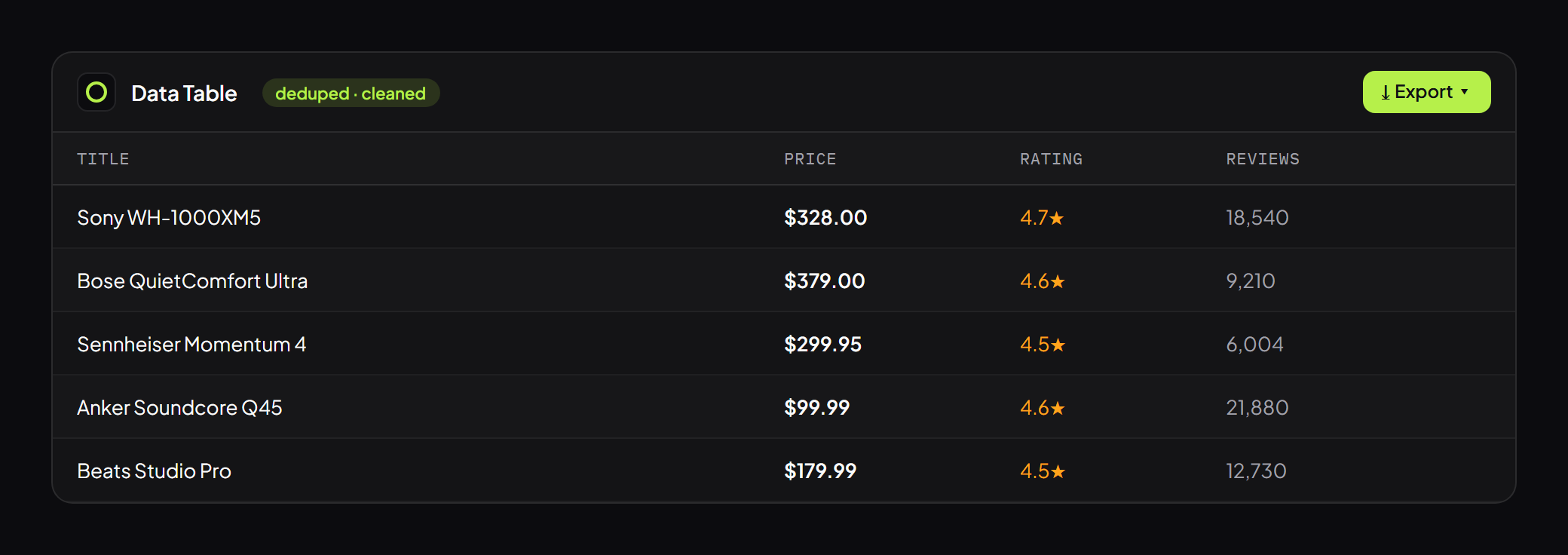
Grabby is the tool we build, so here is the honest version. It keeps the one-click feel of Instant Data Scraper, with auto-detect for the fast path, then adds the things that tool leaves out. You can point and click to add, rename, or drop individual fields on a card layout, follow a column of links into each detail page and merge the extra fields back in, and clean the result in an editable table that dedupes, drops empty rows, and hides columns before export. Exports cover CSV, JSON, Excel (TSV), Markdown, or a copy straight into Google Sheets, and there are built-in extractors for emails, images, and social links. The honest caveats: it runs in the browser, so there is no scheduled cloud run, and it is free in early access rather than free forever, which means the terms can change later. For a free no-code tool that handles detail pages and cleanup without a paid plan, it is the most complete option here, which is why it tops the list.
3. Web Scraper.io, the sitemap veteran
Web Scraper.io has been a staple of the Chrome Web Store for years, and its model is different from auto-detect. You build a “sitemap” by defining selectors for the elements you want, including link selectors that step into detail pages, so it handles multi-level scrapes that a one-click tool cannot. The free browser extension runs locally and exports to CSV or XLSX. The trade-off is the learning curve. Building a sitemap takes longer than clicking a table, and the model can struggle with heavily dynamic pages or odd pagination. The free tier is local only, so scheduling, parallel runs, and cloud storage sit behind paid plans that start around $50 a month and climb from there. If you want precise control and don’t mind the setup, the free extension alone gets a lot done.
4. Octoparse, the heavy-duty visual builder
Octoparse is a desktop app rather than an extension, and it aims higher than a quick grab. You point a visual workflow builder at a site, click the fields you want, and it produces structured data with support for deep crawling into detail pages, infinite scroll, and complex multi-step flows. Exports include CSV, Excel, JSON, and direct database output. The free forever plan gives you 10 tasks with local extraction and limited run history, which is plenty for a one-off project. Cloud extraction, scheduling, and background runs start around $69 a month billed annually and rise quickly from there. Octoparse is the pick when your scrapes are genuinely complex and you are willing to spend an afternoon learning the builder. For a five-minute table grab it is more tool than the job needs.
5. ParseHub, the desktop app for tricky sites
ParseHub is another desktop application built around a visual editor, with a reputation for coping with JavaScript-heavy and AJAX pages. You click elements, add commands to click into links or page through results, and pull text, HTML, and attributes, with exports to CSV, Excel, JSON, or an API. The free plan is usable for testing, with 200 pages per run, five public projects, and 14-day data retention, though public projects mean your scrape setups aren’t private. The jump to paid is steep. Private projects and higher page limits start around $189 a month. ParseHub earns its place for awkward sites that defeat simpler tools, as long as the free plan’s page cap and retention window fit what you are doing.
Which free alternative should you pick?
For most people leaving Instant Data Scraper, the sticking point is detail pages or field selection, and a free browser tool that handles both is the shortest path. That is the gap Grabby was built for, and it stays free without a cloud plan.
If you want maximum control over selectors and don’t mind building a sitemap by hand, Web Scraper.io’s free extension is a proven choice, with a clear upgrade path to the cloud when you need scheduling.
If your scrapes are complex and recurring, Octoparse and ParseHub are the serious desktop options. Both have real free tiers for testing, and both expect you to pay once you need scheduling, private projects, or higher volumes.
A concrete example ties it together. Scraping a supplier directory for name, city, and category off the listing page is a job any tool here does well, Instant Data Scraper included. Scraping that same directory for each supplier’s email and phone number, which usually sit on their individual profile page, is the job that needs detail-page scraping, and that is where the auto-detect baseline drops out and the other four earn their keep.
The honest verdict
Instant Data Scraper is still a great free tool for a fast, one-off grab of a single clean table, and there is no reason to abandon it for that. The reasons to add an alternative are specific: detail pages, precise field selection, cleaner exports, or heavier recurring jobs. For a free, no-code tool that covers the first three without a paid plan, Grabby is our pick, and we would say so even if it weren’t ours. For hand-built precision, Web Scraper.io. For complex or scheduled work, Octoparse or ParseHub once you are ready to pay. Pick the one that matches the wall you actually hit, not the one with the longest feature list.
Try it on your next scrape
New to no-code scraping? Start with our guides to scraping Amazon product data, Google Maps leads, or any website to Excel. Then install the free Grabby extension and put it up against the scrape that needed more than a single table.